Your public profile
What your Galmund public profile shows, how to find it, and how to control what's visible.
Last reviewed: 2026-09-13
Your Galmund public profile is your travel story: the countries you've been to, the memories you choose to share, and the trips you've made public.
Your profile URL
Every Galmund account has a public URL: galmund.com/u/yourusername
Share this link with anyone. They don't need a Galmund account to view it.
What's shown on a public profile
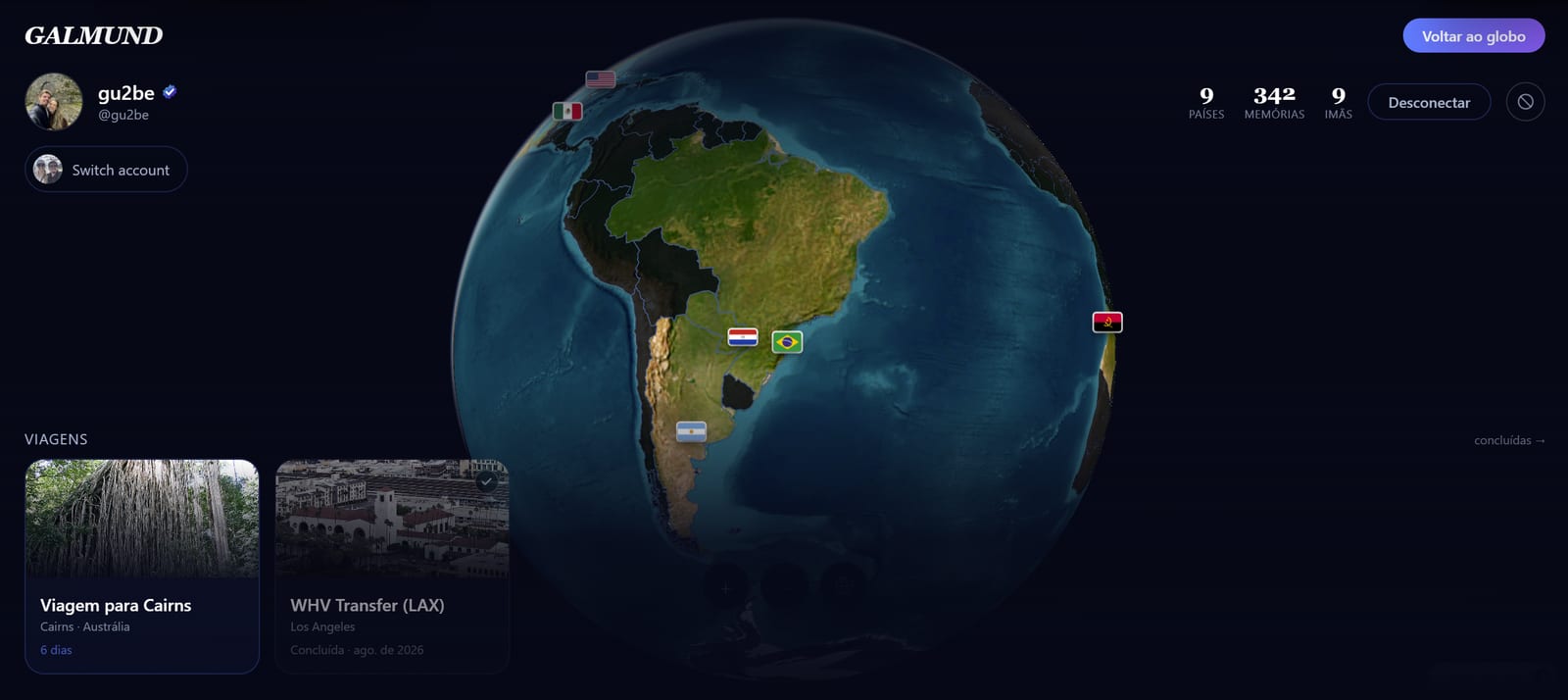
| Content | When visible |
|---|---|
| Display name | Always (if profile is discoverable) |
| Plan badge | Next to the name, if the account is Galmund+ or Member |
| Countries visited | Always (if profile is discoverable) |
| Public memories | When "Share memories" is enabled |
| Trip strip (done, live, upcoming) | When "Share trips" is enabled |
| Hometown | When you've set it in profile settings |
The trip strip
Visitors to your profile see a horizontal strip of your trips, in this order: done trips first, then whichever is currently happening (tagged LIVE), then upcoming ones. Scrolling opens right on the live trip, or the nearest upcoming one, if nothing's happening right now. Clicking a card opens that trip's public itinerary.
Connecting from the profile
A logged-in visitor sees a Connect button (or Block, in the profile menu) right on your public profile: the entry point to the Connections system. See the Connections article for how to accept, view, and manage who connects with you.
Making your profile discoverable
- Go to Profile settings (click your avatar)
- Turn on Discoverable profile
This is the master switch. With it off, nothing on your profile is visible to anyone who isn't your connection.
Turning on memory and trip sharing
In the same settings page, turn on Share memories to show your public memories as pins on your profile's globe, and Share trips to display your trip strip. Private memories are never shown, regardless of these settings.
💡 You can turn sharing on and off at any time. Changes take effect immediately. Turning off sharing hides your memories and trips from your profile without deleting them. If you turn Discoverable profile back on after having it off, Galmund asks whether you also want to make your existing memories and trips public, not just new ones.
Frequently asked questions
Is my profile public by default?
If you created your account on or after September 2, 2026, yes: discoverable profile and memory/trip sharing are already turned on. Older accounts are unaffected and keep whatever they had before. Either way, you can turn all three off in Profile settings at any time.
Can I see what my profile looks like to others?
Yes. Visit galmund.com/u/yourusername while logged in. You'll see exactly what other people see when they visit your profile.
What's the difference between a discoverable profile and shared memories?
Discoverable means others can find your profile by username and connect with you. Shared memories controls whether public memories appear on your profile. You need both turned on for your memories to be visible to people who aren't your connections.
Can I have a custom URL?
Your URL is galmund.com/u/yourusername. Change your username in profile settings to change the URL.