The trip budget
How the Budget tab works: what's tracked automatically, grouped repeat expenses with editable averages, and which currency each category uses.
Last reviewed: 2026-09-13
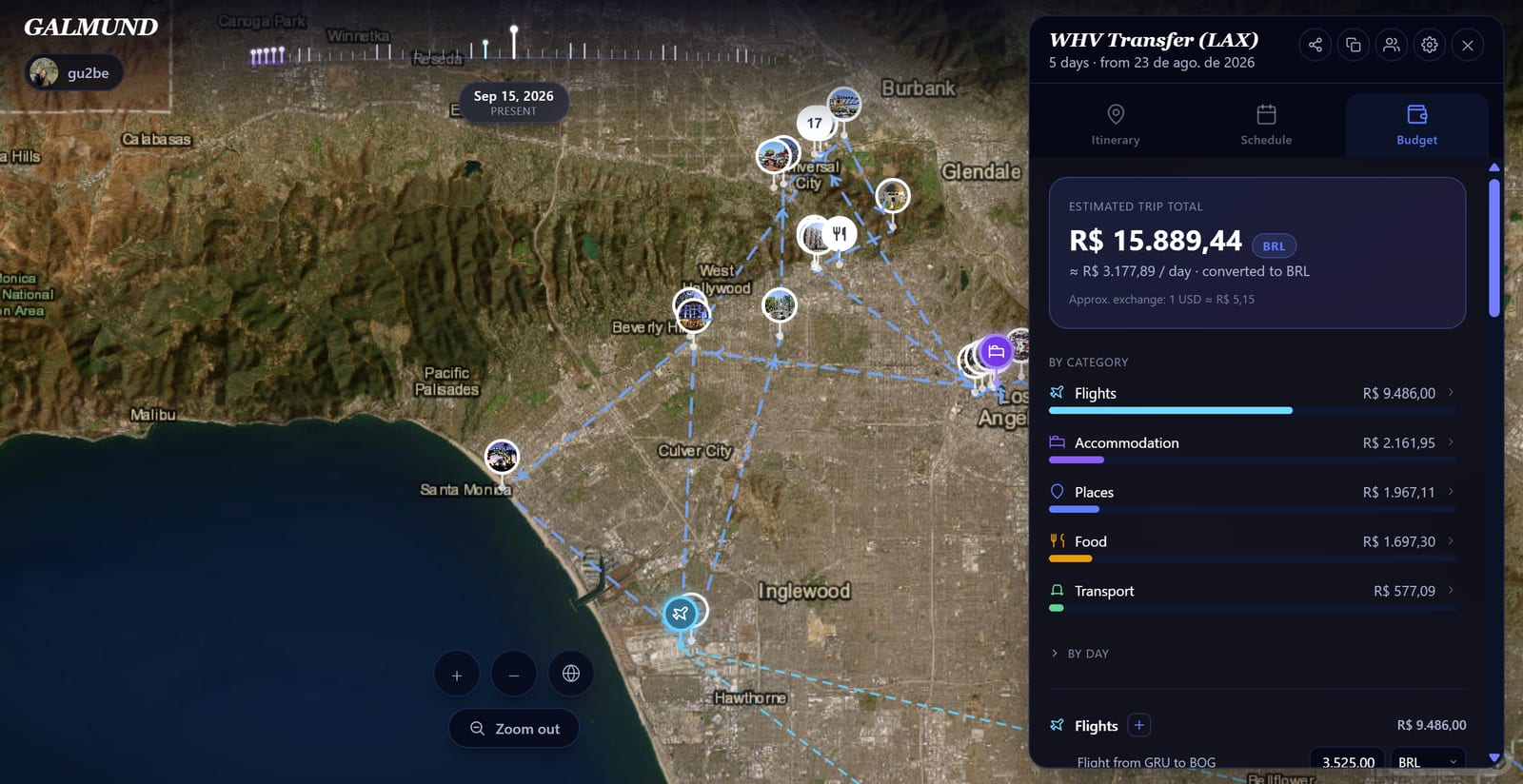
The Budget tab keeps a running estimate of what a trip costs, split into flights, accommodation, places, food, transport, shopping, and extras.
What's tracked automatically
Costs you already set while planning (on a flight, a stay, or a place in your itinerary) appear in the budget on their own. Food, transport, shopping, and other extras don't have a home elsewhere in the trip, so you add those directly in the Budget tab.
Grouped repeats: one average, one total
Stay two nights at the same hotel, or visit the same place twice, and the Budget tab groups those occurrences into a single collapsible block instead of listing them separately. The block's header shows an average and a total, both editable, and editing either one applies that value to every occurrence in the group at once.
Need one night or visit to have its own, different cost? Expand the block and edit that single row; it won't touch the others.
💡 A group only forms when something repeats. A hotel you stayed at once, or a place you visited only once, shows up as a plain row, since there's no average to speak of for a single occurrence.
Currencies in the budget
Places, food, transport, and shopping default to the currency of wherever the trip is headed. Accommodation, flights, and extras default to your own profile currency instead, since those tend to be booked or paid from home. Any individual item can still be switched to a different currency using its currency field.
If a group mixes currencies (say, one day of food paid in a different currency mid-trip), the Budget tab never adds those amounts together directly. It splits the group into separate blocks by currency, each with its own average and total, so nothing gets silently mixed up.
Your default currency
Your profile currency is set from your home country when you sign up, and it's what the trip's overall total is converted into. Change it any time in Profile settings → Currency.
The trip total
The number at the top of the Budget tab converts every category, regardless of what currency each item is in, into your profile currency, using current exchange rates, for one estimated total for the whole trip. Right below the total, an approximate per-day figure divides that total by the length of the trip.
Navigating the budget
A By category shortcut at the top jumps straight to that category's detailed section. A By day breakdown (one bar per day of the trip) stays collapsed by default, since on long trips, expanding it right away would make the panel huge before you even reach the categories. Click to open it on demand. After scrolling a bit, a floating Back to top button shows up to jump back to the summary.
Frequently asked questions
Do I need to enter every expense manually?
No. Flights, accommodation, and places you've already added to the trip show up in the budget automatically, using whatever cost you set on them. Food, transport, shopping, and extras are entered directly in the Budget tab.
What happens when I stay at the same hotel for several nights or visit the same place more than once?
Those repeats collapse into a single block with an editable average and an editable total. Change either one and every occurrence in the group updates to match, or expand the block to edit a single night or visit on its own.
What currency does the budget use?
Places, food, transport, and shopping default to the currency of the trip's destination country. Accommodation, flights, and extras default to your own profile currency. You can still set a different currency on any individual item if you paid for it differently.
What if I paid for things in the same group with different currencies?
The group splits into separate same-currency blocks (each with its own average/total) instead of adding mismatched currencies together. The trip's overall total still converts everything into one number using current exchange rates.
Where do I change my default currency?
In Profile settings → Currency. It's set from your home country when you sign up, but you can change it any time.