Restaurants tab
Discover recommended restaurants near each stop on your trip, see price range and rating, and add them to your itinerary.
Last reviewed: 2026-09-13
The Restaurants tab is where you discover where to eat near each stop on your trip.
Browsing recommended restaurants
Inside a stop, the Restaurants tab loads a carousel of nearby restaurants, sourced from Google Places, the same infrastructure used in Attractions and Stays. Scroll horizontally through the cards to explore them.
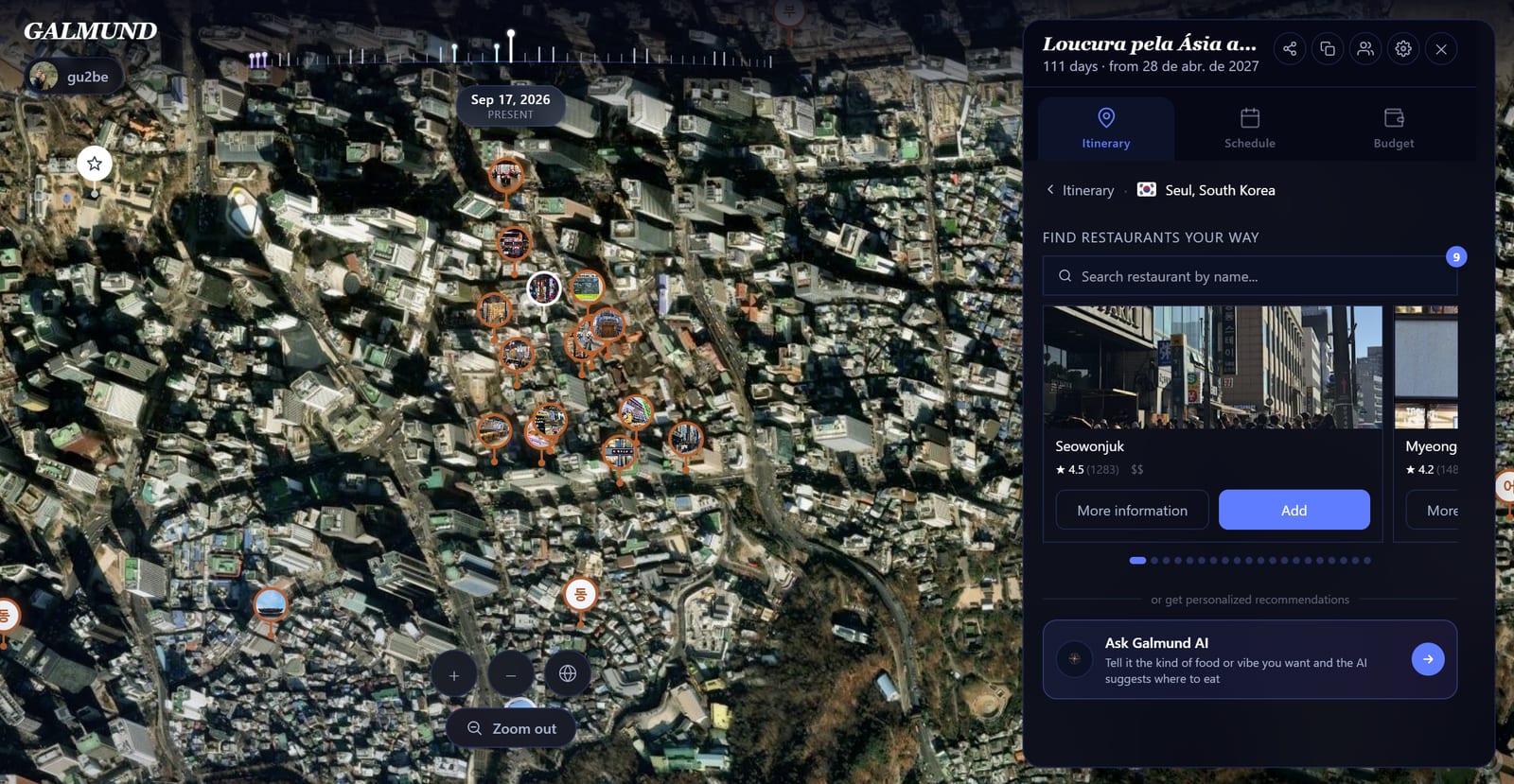
Each card shows:
- A photo of the restaurant
- Name and address
- Price range as symbols ($ to $$$$)
- Rating and review count (when available)
- An Add / Remove toggle button
💡 After panning the map or zooming into another part of the city, a Load places in this area button shows up if most of what's already loaded is now outside the visible area: click it to search for restaurants centered there.
Getting more information
Click More info on any card to open the detail panel, with phone, website, and opening hours (when Google Places has that data), plus photos and reviews.
Searching for a specific restaurant
Use the search field at the top of the tab. A badge next to it shows how many searches you have left today on your plan. If the search doesn't find anything at first, Galmund automatically retries via Google Places.
Asking Galmund AI
Below the carousel, a card invites you to ask Galmund AI directly for where-to-eat recommendations. See its own article for how that works and each plan's daily quota.
Adding a restaurant to the itinerary
Click + Add on any card to add it to your trip. It appears in the Itinerary list, inside the matching stop, alongside the attractions there, but without the automatic distance-based reordering that's exclusive to Attractions. The order always follows the sequence you added things in, though you can still drag to reorder manually.
Frequently asked questions
Where do the recommended restaurants come from?
From Google Places, with details like phone, website, and opening hours coming from the same search, no separate second lookup.
What do the price symbols mean?
They come straight from Google Places: from $ (cheapest) to $$$$ (priciest), for that restaurant's typical price range, not a Galmund estimate.
Do restaurants auto-reorganize by distance, like Attractions?
No. Automatic reorganizing only happens in the Attractions tab. Restaurants (and Stays) always keep the order you added them in.
The restaurant I want doesn't show up in search. What do I do?
Search by its exact name. If it still doesn't appear, Galmund automatically retries via Google Places; if that doesn't work either, add it manually from the map result.
Can I see more restaurants beyond what's already loaded?
Yes. Pan the map or zoom into another part of the city and click "Load places in this area" when it shows up, to search for restaurants centered exactly there.