Connecting with other travelers
Find and connect with other Galmund users, share your invite link, and block anyone you don't want seeing your profile.
Last reviewed: 2026-09-13
Connections is Galmund's network of contacts between travelers: it decides who sees what on your profile and in the Community feed.
💡 The Connections screens are currently interface-only in Portuguese, regardless of your language setting: this article uses the exact labels you'll see, with the English meaning alongside.
Opening the Connections panel
Click the Conexões (Connections) box on your profile panel.
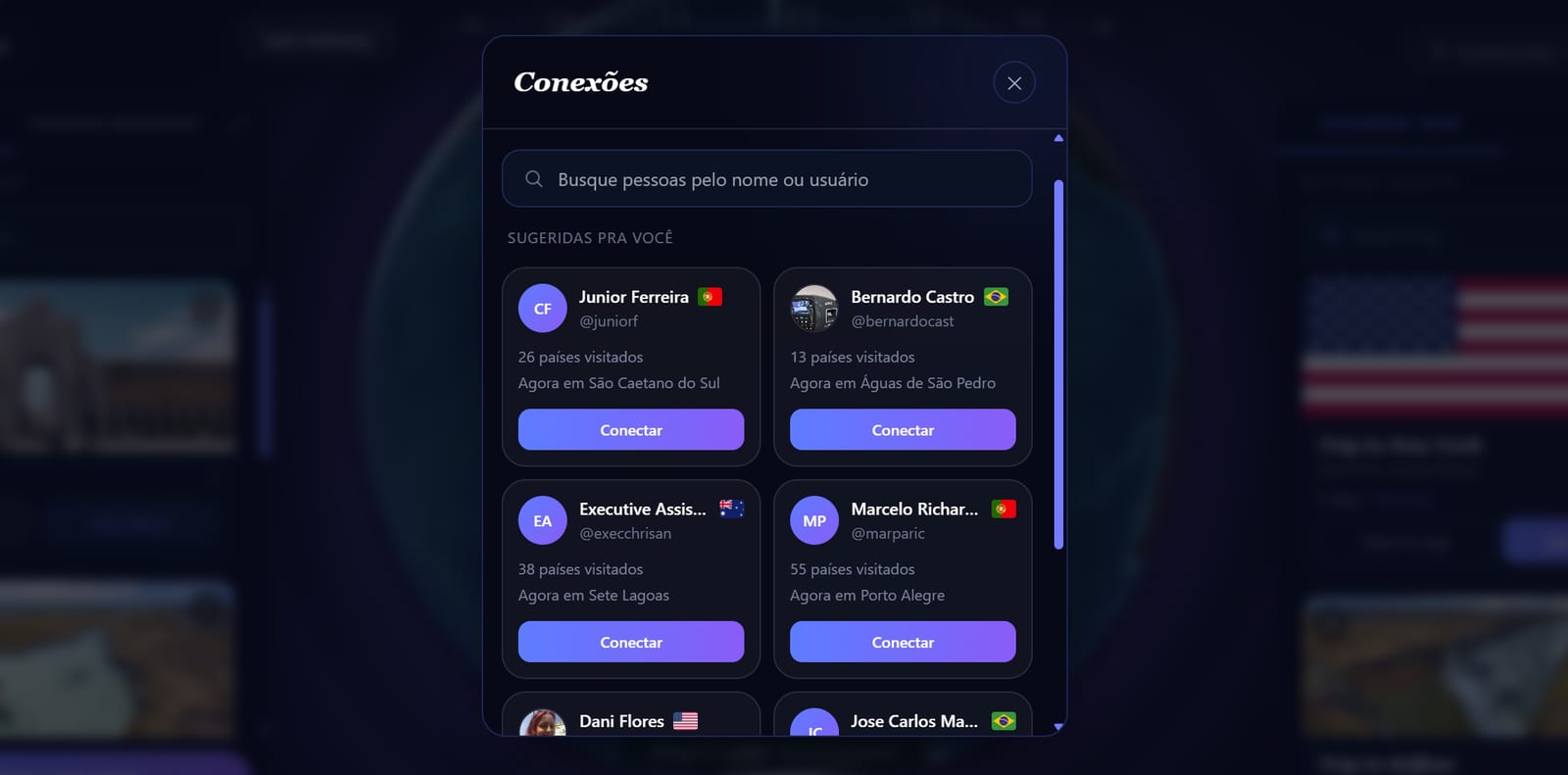
The screen opens with a grid of affinity-based suggestions (people who share your hometown or your last-visited country) instead of asking you to search for a username. Use the search field at the top to filter that grid.
Connecting
Click Conectar (Connect) on any suggestion card, or the Conectar button right on someone's public profile. There's no approval request: the connection is created instantly, both ways.
💡 There's a rate limit on connecting with too many people too quickly: if you hit it, wait a bit before trying again.
Inviting someone outside Galmund
In the Connections panel, expand the invite section and click Copiar link (Copy link). Anyone who signs up through that link is automatically connected with you right away, and lands on your profile after signing up.
What a connection can see
Being someone's connection unlocks more than a regular visitor sees:
- Their full profile, even if they've turned off general sharing
- Their approximate current location (if they've filled in that field on their profile)
- Their visited countries, even on non-discoverable profiles
Trip budgets and place descriptions stay private either way, for everyone.
Removing or blocking someone
- Remove a connection: open Todas as minhas conexões (All my connections) in the Connections panel and use the remove button on that person's card.
- Block: on the person's public profile, use the menu next to the connect button. Blocking is silent: the other person gets no notification, they just lose the ability to see your profile or connect with you.
Frequently asked questions
Do I need the other person's approval to become connections?
No. Connecting is instant, with no approval request: the moment you click Connect, you're already connections.
What can a connection see about me that other users can't?
Your approximate current location and visited countries, even if your profile has general sharing turned off for regular visitors. A connection can always see your profile. Trip budgets and place descriptions stay private either way.
How do I block someone?
On the person's public profile, use the menu next to the connect button and choose Block. Blocking is silent: the other person isn't notified.
How do I find people I might know?
Open the Connections panel from your profile: it already suggests people based on affinity (same hometown, or the same last-visited country), no need to search by username. You can also search directly within the loaded suggestions.
Is there a limit on how many invites I can send?
Yes, there's a rate limit to prevent invite spam: if you try to connect with too many people too fast, Galmund asks you to wait a bit.